
Research
Getting Started
The Oxford Magnificent Parchment is more than two and a half metres long. Unrolled, this ilan (“tree”) maps the divine realm in words and images. Seen close up, even the pupil of a drawn eye has room for a text. Let’s read it.
Links marked ↗ open in a new tab so you can keep these instructions beside the manuscript.
Search the collection
On the Search page ↗, try Oxford ↗ in Search manuscripts. If you want to see copies of the same design in several libraries, clear the search and use the controls above the thumbnails.
Sort by. Put the results in title order (A–Z or Z–A), or by date or period, from early to late or late to early. Try the Magnificent Parchments in chronological order ↗.
Family. A family brings together copies that share a diagrammatic design. Choose Magnificent Parchment ↗ to see which collections hold examples.
More filters. Material distinguishes parchment from paper. Form describes the object’s format, such as a sheet, a codex (a bound book), or a rotulus (a scroll read vertically). Handwriting filters by the recorded script, and Main Language by the principal language. Combine them to find parchment scrolls within the Magnificent Parchment family ↗.
Names or shelfmarks. Click the little book icon beside the filters to switch the labels beneath the thumbnails. The Vatican manuscript called Small Parchment in the name view appears as Vatican City, BAV, Ms. Borg. ebr. 21 in the shelfmark view. The latter gives the library and its call number, which is particularly helpful when several copies share a name.
To follow this guide, open Oxford, BL, Ms. Hunt. Add. D ↗. Under General you’ll find the scroll’s date (ca. 1600), dimensions (255 × 75 cm), and home in the Bodleian Libraries.
Read the inscription inside the eye
In the manuscript panel, choose Features beside General for an index to the annotated parts of this scroll. Near the top, select Eye, numbered 1.0.3, or open the eye directly ↗. The viewer highlights the pupil and opens the Object tab. Hebrew Text transcribes the writing in the selected area. Read its English translation immediately below, under Translation.
Open the Oxford parchment in a new tab
The large words in the pupil are אין סוף, Ein Sof (“No End”), a name for the infinite divine. The smaller inscription begins, “Languages fail to speak of It.” The editors identify the eye with the all-seeing divine. The drawing invites you to consider the limits of human speech alongside the reach of divine sight.
Follow the menorah into another manuscript
Open the Oxford menorah ↗ and count its seven branches. Scroll down the Object tab to Similar Objects. Each thumbnail opens a detail associated with the same lamp. Look for the Vatican thumbnail. What does this scribe give you in place of the drawing?
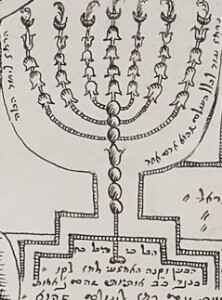
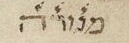
In Vatican City, BAV, Ms. Borg. ebr. 21 ↗, the scribe wrote מנורה (“menorah”) where the Oxford scribe drew the seven-branched lamp. The menorah belongs to Ḥesed (“Lovingkindness”) in both trees. Ḥesed is one of the ten sefirot, the divine powers mapped on the tree.
Compare two manuscripts
To see what two copies share, open Compare ↗ in the main menu. Choose Magnificent Parchment in the Family menu. Switch to shelfmarks if the titles look alike. Select the thumbnails for Oxford, BL, Ms. Hunt. Add. D and Cincinnati, HUC, Klau Library, Scrolls 65.1, then choose Start Comparison. You can select up to three manuscripts.
Try the Oxford–Cincinnati comparison ↗ below. Open the arrow beside either shelfmark for that manuscript’s controls. Leave one scroll at an overview and zoom into the other, or bring the chain of large circles into view in both. Their opening magnifications can differ, so consult the dimensions under General if your question concerns physical size.
Trace a feature across the collection
Choose Features ↗ in the main menu to follow a subject across the collection. In Search features, type Ayn Sof, the index spelling of Ein Sof (“No End”), and open the entry ↗. Compare a second Oxford eye ↗, where the scribe wrote only the initials א״ס, with the half-darkened circle in Munich ↗. For a closer look at how editors connect such different images and how to read the graph behind the index, continue to Reading Ilanot through Features.
Where to go next
Under Research you’ll find lectures, publications, and more Introductions. To see what it takes to handle a parchment of this size, open Ilanot at Human Scale. For the history of the Magnificent Parchment family, see J. H. Chajes, The Kabbalistic Tree, pp. 59–73.
About introduces the project and the people who make the editions. Start with The Ilan Genre for an account of how kabbalists used these diagrams.